
When you publish the Lookfy gallery by using the embed code, you need to enable the Lookfy App Scripts. That causes the Lookfy scripts to load on all the pages of your store. This isn’t necessary if you only want to show the gallery on specific pages (for example, a gallery page or product page). As a result, your site may not achieve a maximum page speed score in performance tools such as PageSpeed Insights and GTmetrix.
To avoid this, exclude the Lookfy app scrips from unnecessary pages.
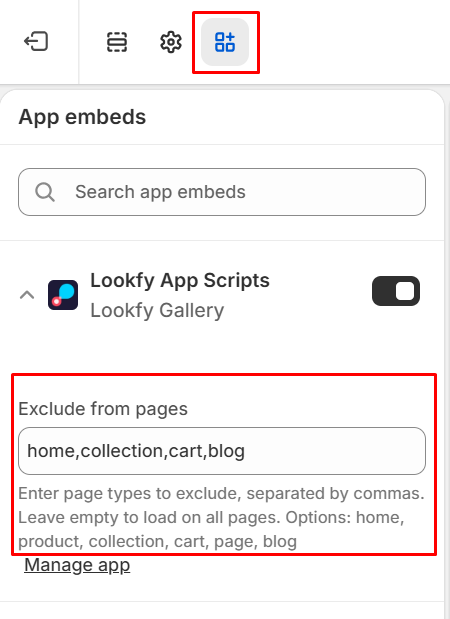
From your Shopify admin, go to Online Store, Themes. Find the theme that you want to edit, and then click Edit theme or Customize. Find and click the App embeds icon.
Click the search bar and enter ‘lookfy’ to search. Click on Lookfy App Scripts to open its settings.
You will see the Exclude from pages box. Here you can input: home, product, collection, cart, page, blog, to exclude the scripts from the page types you choose. If you enter multiple items, separate them with commas.
Then click Save button at the top-right corner. And you are done!